
BT Game Permissions Guide 2026 – Understand App Permissions and Privacy Settings
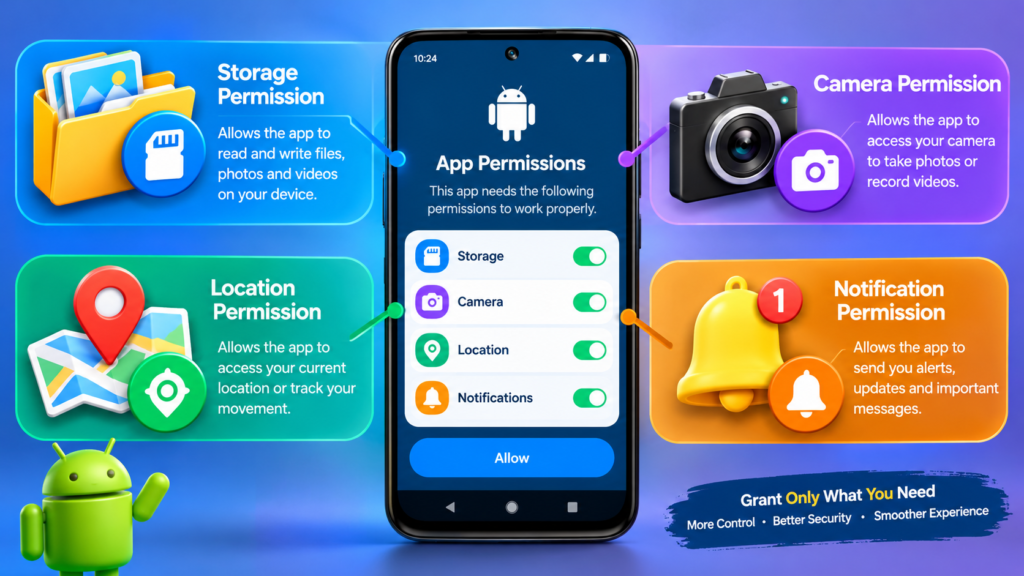
The BT Game Permissions Guide helps Android users understand app permissions and make informed choices about their privacy. When installing or using an app, you may see permission requests for features such as storage, notifications, camera, or location. Each permission should be reviewed carefully before you allow access.
Understanding these settings can help you protect personal information, manage app access, and maintain better control over your Android device. This guide explains common permissions, how to review them, and what to do if you notice a permission you do not understand.
What Are BT Game App Permissions?
App permissions determine which features or information an application can access on your phone. Depending on the app’s design and Android version, it may request access to certain device functions.
The BT Game Permissions Guide is intended to help users understand these requests rather than automatically approve them. A permission request does not always mean an app will use that feature continuously. You should check the purpose of each request and allow access only when it is necessary for a feature you want to use.
Common Android App Permissions Explained
1. Storage and Photos Access
Some applications may request access to photos, videos, or files for specific functions. On newer Android versions, access may be limited to selected photos or files instead of the entire storage.
Review the permission carefully and choose the most limited option available if it meets your needs.
2. Notification Permission
Notification access allows an app to send alerts to your device. These may include account updates, reminders, or other messages, depending on the app.
If you do not want notifications, you can usually disable them through Android settings without uninstalling the application.
3. Camera and Microphone Permission
Camera and microphone permissions allow an app to use these hardware features when authorized. Do not grant them unless you understand why the app needs them for a feature you intend to use.
If a permission request seems unrelated to the app’s purpose, deny it and check the app’s official information before proceeding.
4. Location Permission
Location access may allow an application to determine your device’s location. If an app does not need location-based features, consider leaving this permission disabled.
When available, choose approximate location or access only while using the app instead of granting broader access.
How to Check BT Game Permissions on Android
Follow these general steps to review the permissions for an installed app. Menu names may vary by Android version and phone manufacturer.
-
Open the Settings app on your Android phone.
-
Select Apps or Applications.
-
Find and select BT Game from the installed-app list.
-
Tap Permissions or App permissions.
-
Review the permissions listed on the screen.
-
Change any unnecessary permission to Don’t allow or the most limited available option.
This part of the BT Game Permissions Guide is useful when you want to check app access after installation or change a decision you made earlier.
How to Manage Permissions Safely
1. Allow Only Necessary Access
Do not approve every request automatically. Consider whether the requested permission is needed for a feature you want to use. If you are unsure, deny it until you can verify its purpose.
2. Review Permissions Regularly
Check app permissions after updates or whenever you notice unfamiliar behavior. Android may also provide privacy dashboards or permission indicators that help you review recent access to sensitive features.
3. Keep Your App and Android Updated
Install Android security updates and obtain apps only from sources you trust. Before installing an APK from a third-party website, verify the source and understand that an APK may carry risks if it has been modified or is untrustworthy.
What If BT Game Requests an Unusual Permission?
If BT Game requests access that appears unnecessary, do not grant it immediately. Read the permission message, check the app’s available documentation, and consider whether the feature you are trying to use explains the request.
You can deny the permission and see whether the app still works as expected. Some features may not function without specific access. If the app repeatedly requests sensitive permissions without a clear explanation, consider stopping use of the app until you can verify its legitimacy.
The BT Game Permissions Guide cannot confirm which permissions a particular BT Game version genuinely requires. Actual requests may differ according to the app version, device, and available features.
Benefits of Understanding App Permissions
Understanding permissions gives you more control over your device and personal information. It can help you limit unnecessary access, reduce unwanted notifications, and make better decisions when installing applications.
However, permission settings alone cannot guarantee complete privacy or security. Use a strong device lock, keep your software updated, avoid sharing sensitive information unnecessarily, and review the privacy information provided by the app.
Frequently Asked Questions
1. Are all BT Game permissions necessary?
Not necessarily. The permissions required depend on the app’s features and version. Review each request and allow only access you understand and need.
2. Can I deny a permission after installing BT Game?
Yes. Android generally allows you to change app permissions through Settings. Some features may stop working if they depend on a denied permission.
3. How can I check whether an app can access my location?
Open Android Settings, select the app, and review its permissions. You can also check the device’s Privacy or Permission Manager section if available.
4. Is it safe to allow every permission?
No. It is better to review permissions individually and grant only the access needed for your intended use.
Conclusion
The BT Game Permissions Guide explains how Android app permissions work and how to review them responsibly. Check permissions before granting access, disable permissions you do not need, and keep your device updated. These simple steps can help you make more informed privacy decisions while using Android applications.
Always verify the app’s source and review its privacy information before installing or using it.